| 일 | 월 | 화 | 수 | 목 | 금 | 토 |
|---|---|---|---|---|---|---|
| 1 | 2 | 3 | ||||
| 4 | 5 | 6 | 7 | 8 | 9 | 10 |
| 11 | 12 | 13 | 14 | 15 | 16 | 17 |
| 18 | 19 | 20 | 21 | 22 | 23 | 24 |
| 25 | 26 | 27 | 28 | 29 | 30 | 31 |
- embedded system
- flying-fish ir sensor
- Electronics
- arduino idl
- analog to digital conversion
- mh-sensor series
- leds control
- Open source
- embedded systems
- Arduino UNO
- Arduino
- BreadBoard
- potentiometer
- DIY
- ADC
- i2c lcd1602
- Analog
- Communication
- led
- arduino led blink
- Digital
- sensor reading
- Today
- Total
eng-life 님의 블로그
Arduino Uno: LED Visual Display (4) 본문
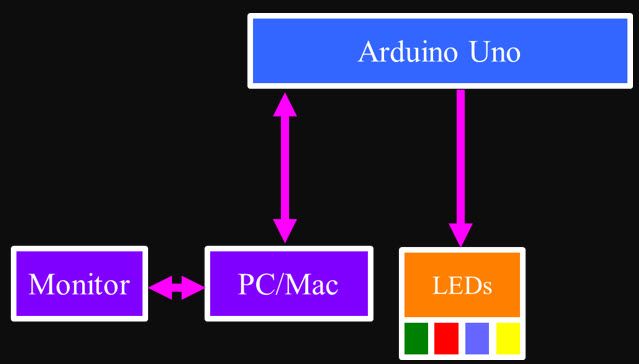
Duplicate the LED Circuit three more times.
1. Construct the circuit using a breadboard as shown in the diagram below.
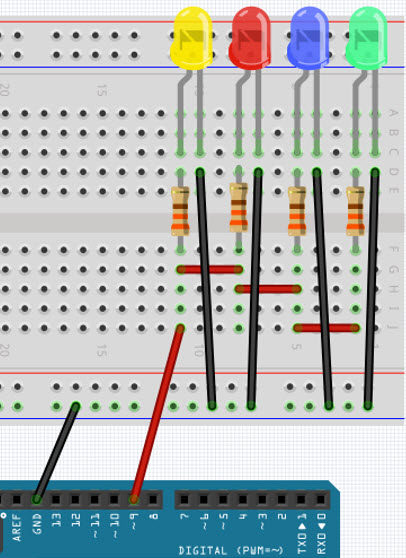
2. Note negative leads and connect to GND Rail.
3. Keep color order.
4. Tie all resistors (1 kΩ) together.
5. GND should still be connected to Arduino GND
6. Red wire should still be connected to Arduino Pin 9.
7. Upload the code and verify all LEDs blink

8. Tinker until all are this point.
Now that we know all the LEDs on our Dispaly are working, let's use the Arduino to control each LED individually.
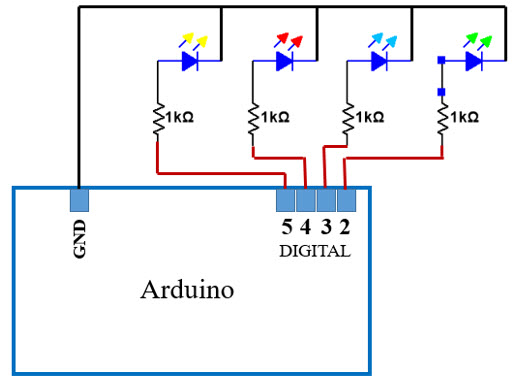
1. Remove wires connecting resistors and Pin 9 from Arduino.
2. Connect Yellow LED resistor to Pin 5
3. Connect Red LED resistor to Pin 4
4. Connect Blue LED resistor to Pin 3
5. Connect Green LED resistor to Pin 2
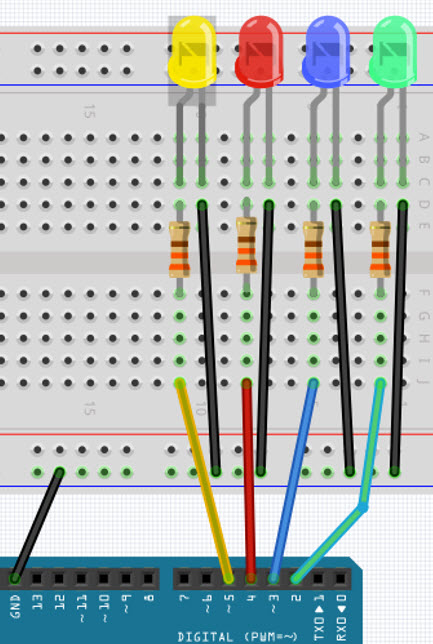
6. Modify your sketch.
- "Comment out" int LED = 9;
- pinMode for pins 2, 3, 4, and 5 as OUTPUTs.
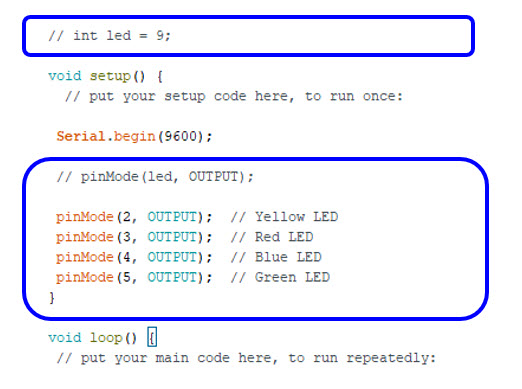
7. Turn off LEDs at start of loop: digitalWrite(Pin #, LOW)
8. Turn on individual LEDs as shown: digitalWrite(Pin #, HIGH)
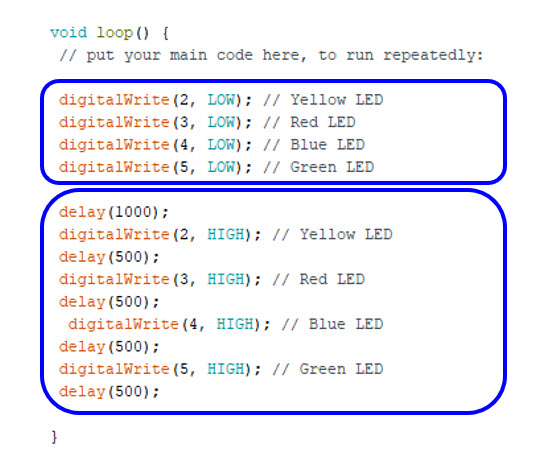
9. Compile code and check for messages.
10. Upload code to Arduino
- Should see Green LED turn on, then Blue, then Red, then Yellow
- Tinker with the delay times until all terms here.
11. Save your Sketch file.
'ENGR' 카테고리의 다른 글
| Arduino Uno: Potentiometer (6) (1) | 2025.06.03 |
|---|---|
| Arduino Uno: Analog vs. Digital (5) (0) | 2025.06.03 |
| Arduino Uno: Blink an LED (3) (3) | 2025.06.02 |
| Arduino Uno Communication (2) (1) | 2025.06.01 |
| Arduino Uno Overview (1) (2) | 2025.06.01 |


