
| 일 | 월 | 화 | 수 | 목 | 금 | 토 |
|---|---|---|---|---|---|---|
| 1 | 2 | 3 | ||||
| 4 | 5 | 6 | 7 | 8 | 9 | 10 |
| 11 | 12 | 13 | 14 | 15 | 16 | 17 |
| 18 | 19 | 20 | 21 | 22 | 23 | 24 |
| 25 | 26 | 27 | 28 | 29 | 30 | 31 |
- Analog
- embedded systems
- arduino idl
- flying-fish ir sensor
- Digital
- Arduino
- leds control
- ADC
- DIY
- i2c lcd1602
- BreadBoard
- Arduino UNO
- Open source
- sensor reading
- embedded system
- led
- Electronics
- analog to digital conversion
- Communication
- potentiometer
- arduino led blink
- mh-sensor series
- Today
- Total
eng-life 님의 블로그
Arduino Uno: Blink an LED (3) 본문
An example of a simple Arduino program to blink an LED connected to a digital pin (e.g., pin 13)

1. Connect a LED (+lead) to pin 13 and (-lead) to GND. Negative lead is usually the shorter lead.
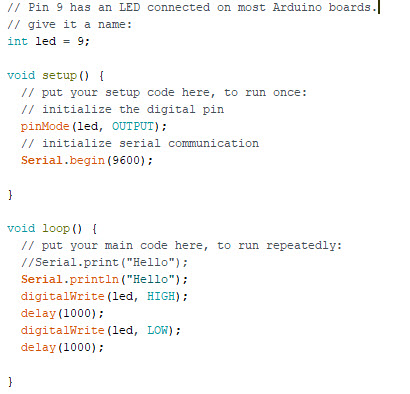
2. Add the following to the definitions area of your sketch: above void setup ( )
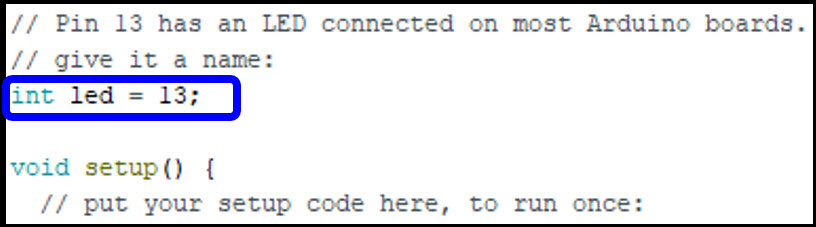
※ Remember, the comments help you and otehrs understand the code.
- “int” : we are defining a data type.
- We are telling the Arduino to let a variable called “led” represent an integer
- Anytime “led” is used in the code, Arduino sees 13
Ex. 12 + led = 25 - There are many more data types
3. Add the following to the your sketch in void setup ( )
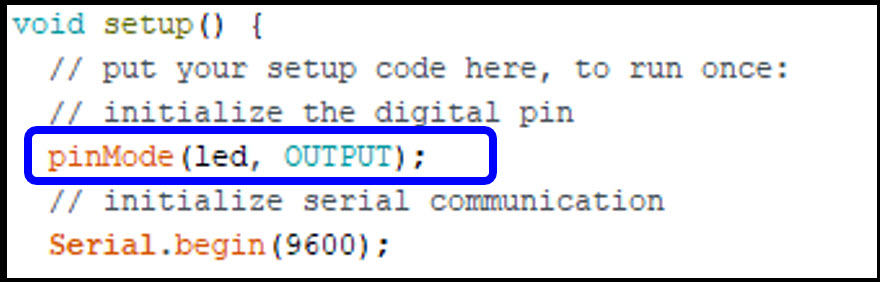
- One use of void setup( ) is to assign pins
- We do this using the function pinMode(pin, mode)
- “pin” refers to a specific pin on the Arduino you are wanting to use (in our case pin 13 aka “led”)
- “mode” is either INPUT or OUTPUT
- OUTPUT sets up the pin so it can give outputs
- INPUT sets up the pin so it can receive inputs - pinMode(led, OUTPUT): Pin 13 is now an output
4. Add the following to your sketch in void loop ( )

void loop ( ) ....
- Runs once void setup is finished.
- Loops through the cod within forever.
digitalWrite(pin, value)
- "pin" is whichever pin your are writing to
- "value" can be either HIGH or LOW
- HIGH means the pin is at 5V - "on"
- LOW means the pin is at 0V - "off"
delay(time)
Tells the Arduino to wait a specific amount of time (in milliseconds) before going to the next line of code.
Ex) 1000 ▶ 1000 ms = 1 sec.
5. Compile (#1) cod and check for messages.
6. Upload (#2) code to Arduino
Does a LED blink?
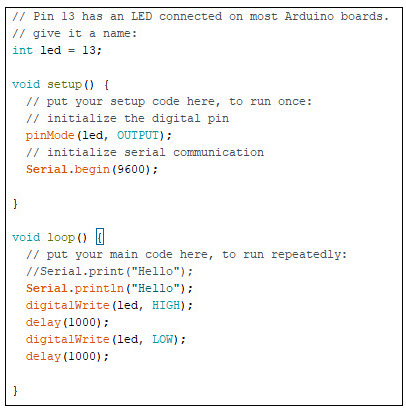
Exercise) Change the delay in teh sketch and try again. Ex) delay time: 500
- Do you see a change?
Remove the LED from PIN 13 and GND
- Another LED on the board should start blinking
- The "L" on the Uno stands for LED
- Do you see this?
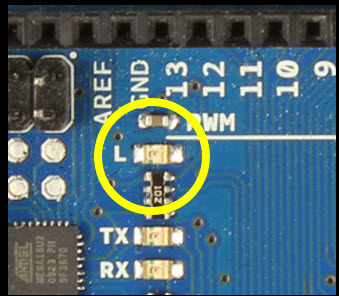
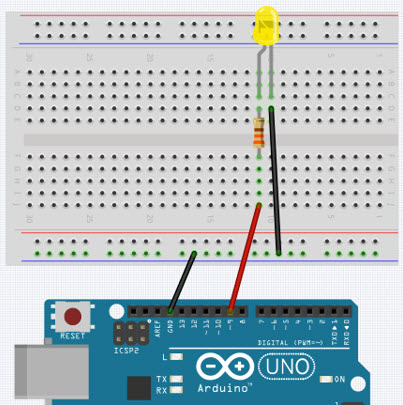
Say you wanted to blink an LED on Pin 9, what would you change in the code?
int LED = 9;
- Could you connect LED directly to Pin 9 ang GND like for Pin 13?
- No (OK for a few seconds) but why?
- LED requires some current limiting (resistor)
- Let's look at Pin 13 on the schematic
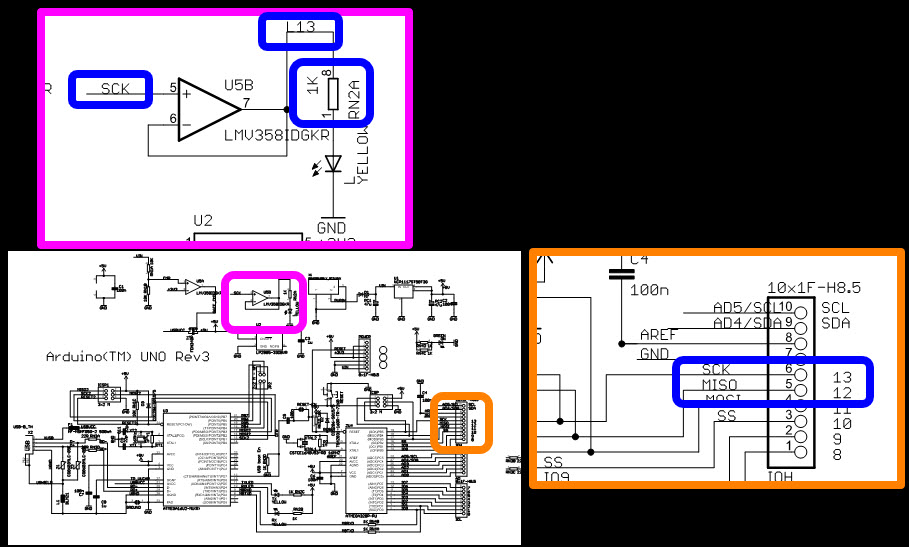
Follow the line and find a built in 1 kΩ resistor.
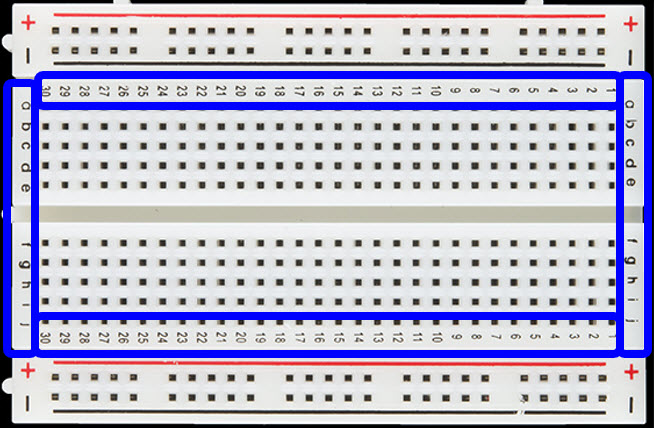
Breadboard
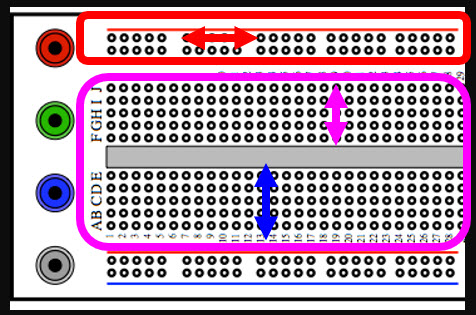
- Columns connected.
- Rows connected on power rails.
- Columns on one side not connected to columns on other side.
- Breadboard has power and ground rails
- Individual points on rails (rows) are connected
- One rail and its points are independent of other rails.
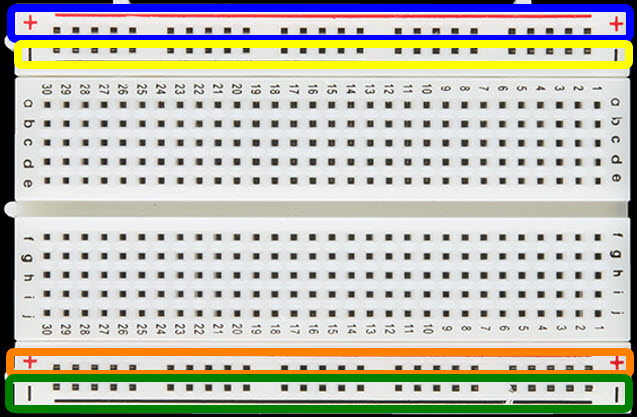
- Also has numbers and letters to coordinate builds
- So if we use any otehr pin to light up an LED, we need to add a resistor (1 kΩ)

'ENGR' 카테고리의 다른 글
| Arduino Uno: Potentiometer (6) (1) | 2025.06.03 |
|---|---|
| Arduino Uno: Analog vs. Digital (5) (0) | 2025.06.03 |
| Arduino Uno: LED Visual Display (4) (0) | 2025.06.02 |
| Arduino Uno Communication (2) (1) | 2025.06.01 |
| Arduino Uno Overview (1) (2) | 2025.06.01 |


